SD.Next openvino setup for Intel Core i7 1355U with Intel Xe iGPU
git clone https://github.com/vladmandic/sdnext cd sdnext/ ./webui.sh --update --insecure --listen --use-openvino |
SD.Next IPEX setup for Intel Core Ultra 9 185H Intel Arc iGPU
https://github.com/vladmandic/sdnext/wiki/Intel-ARC
services:
  sdnext-ipex:
    build:
      dockerfile: Dockerfile
    image: sdnext-ipex:latest
    container_name: sdnext-ipex
    restart: unless-stopped
    devices:
      - /dev/dri:/dev/dri
#     - /dev/accel:/dev/accel
    ports:
      - 7860:7860
    volumes:
      - /docker/sdnext/app-volume:/app
      - /docker/sdnext/mnt-volume:/mnt
      - /docker/sdnext/huggingface-volume:/root/.cache/huggingface
      - /docker/sdnext/python-volume:/usr/local/lib/python3.10
# - /dev/shm:/dev/shm |
proxy is sometimes needed to access Intel video drivers repository. so 'https_proxy=http://proxy.example.com:18080/' to be replaced with working one or removed
# SD.Next IPEX Dockerfile
# docs: <https://github.com/vladmandic/sdnext/wiki/Docker>

# base image
FROM ubuntu:noble

# metadata
LABEL org.opencontainers.image.vendor="SD.Next"
LABEL org.opencontainers.image.authors="disty0"
LABEL org.opencontainers.image.url="https://github.com/vladmandic/sdnext/"
LABEL org.opencontainers.image.documentation="https://github.com/vladmandic/sdnext/wiki/Docker"
LABEL org.opencontainers.image.source="https://github.com/vladmandic/sdnext/"
LABEL org.opencontainers.image.licenses="AGPL-3.0"
LABEL org.opencontainers.image.title="SD.Next IPEX"
LABEL org.opencontainers.image.description="SD.Next: Advanced Implementation of Stable Diffusion and other Diffusion-based generative image models"
LABEL org.opencontainers.image.base.name="https://hub.docker.com/_/ubuntu:noble"
LABEL org.opencontainers.image.version="latest"

# essentials
RUN apt-get update && \
    apt-get install -y --no-install-recommends --fix-missing \
    software-properties-common \
    build-essential \
    ca-certificates \
    wget \
    gpg \
    git

# python3.12
RUN apt-get install -y --no-install-recommends --fix-missing \
    python3 \
    python3-dev \
    python3-venv \
    python3-pip

# Install Python 3.13 from the deadsnakes PPA
#RUN add-apt-repository ppa:deadsnakes/ppa && \
#    apt-get update && \
#    apt-get install -y python3.13 python3.13-dev python3-pip python3-venv

# intel compute runtime
RUN https_proxy=http://proxy.example.com:18080/ wget -qO - https://repositories.intel.com/gpu/intel-graphics.key | gpg --yes --dearmor --output /usr/share/keyrings/intel-graphics.gpg
RUN echo "deb [arch=amd64,i386 signed-by=/usr/share/keyrings/intel-graphics.gpg] https://repositories.intel.com/gpu/ubuntu noble client" | tee /etc/apt/sources.list.d/intel-gpu-noble.list
RUN https_proxy=http://proxy.example.com:18080/ apt-get update

RUN https_proxy=http://proxy.example.com:18080/ apt-get install -y --no-install-recommends --fix-missing \
    intel-opencl-icd \
    libze-intel-gpu1 \
    libze1

# required by pytorch / ipex
RUN https_proxy=http://proxy.example.com:18080/ apt-get install -y --no-install-recommends --fix-missing \
    libgl1 \
    libglib2.0-0 \
    libgomp1

# jemalloc is not required but it is highly recommended (also used with optional ipexrun)
RUN https_proxy=http://proxy.example.com:18080/ apt-get install -y --no-install-recommends --fix-missing libjemalloc-dev
ENV LD_PRELOAD=libjemalloc.so.2

# cleanup
RUN /usr/sbin/ldconfig
RUN https_proxy=http://proxy.example.com:18080/ apt-get clean && rm -rf /var/lib/apt/lists/*
# stop pip and uv from caching
ENV PIP_NO_CACHE_DIR=true
ENV UV_NO_CACHE=true

# set paths to use with sdnext
ENV SD_DOCKER=true
ENV SD_DATADIR="/mnt/data"
ENV SD_MODELSDIR="/mnt/models"
ENV venv_dir="/mnt/python/venv"

# paths used by sdnext can be a volume if necessary
#VOLUME [ "/app" ]
#VOLUME [ "/mnt/data" ]
#VOLUME [ "/mnt/models" ]
#VOLUME [ "/mnt/python" ]
#VOLUME [ "/root/.cache/huggingface" ]

# intel specific environment variables
ENV IPEX_SDPA_SLICE_TRIGGER_RATE=1
ENV IPEX_ATTENTION_SLICE_RATE=0.5
ENV IPEX_FORCE_ATTENTION_SLICE=-1
ENV IPEXRUN=True

# git clone and run sdnext
RUN echo '#!/bin/bash\ngit status || git clone https://github.com/vladmandic/sdnext.git -b dev .\n/app/webui.sh "$@"' | tee /bin/startup.sh
RUN chmod 755 /bin/startup.sh

# actually run sdnext
WORKDIR /app
ENTRYPOINT [ "startup.sh", "-f", "--use-ipex", "--uv", "--listen", "--insecure", "--share", "--server-name sdnext.example.com", "--update", "--debug", "--api-log", "--log", "sdnext.log" ]
#ENTRYPOINT [ "startup.sh", "-f", "--use-ipex", "--uv", "--listen", "--debug", "--api-log", "--log", "sdnext.log" ]

# expose port
EXPOSE 7860

# healthcheck function
#HEALTHCHECK --interval=60s --timeout=10s --start-period=60s --retries=3 CMD curl --fail http://localhost:7860/sdapi/v1/status || exit 1

# stop signal
STOPSIGNAL SIGINT |
docker compose up -d docker compose down --rmi local |
/etc/nginx/sites-enabled/sdnext.conf
server {
        listen       80;
        server_name sdnext.example.com;
        return 301 https://$server_name$request_uri;
    }
server {
        listen 443 ssl;
        server_name sdnext.example.com;
        # SSL Settings
        ssl_certificate /etc/ssl/private/wildcard.pem;
        ssl_certificate_key /etc/ssl/private/wildcard.pem;
        ssl_trusted_certificate "/etc/ssl/certs/wildcard.ca";
        add_header Strict-Transport-Security 'max-age=15552000; includeSubDomains';
        ssl_protocols TLSv1.3 TLSv1.2;
        ssl_ciphers "EECDH+ECDSA+AESGCM EECDH+aRSA+AESGCM EECDH+ECDSA+SHA384 EECDH+ECDSA+SHA256 EECDH+aRSA+SHA384 EECDH+aRSA+SHA256 EECDH+aRSA+RC4 EECDH EDH+aRSA HIGH !RC4 !aNULL !eNULL !LOW !3DES !MD5 !EXP !PSK !SRP !DSS";
        ssl_session_cache shared:SSL:20m;
        ssl_session_timeout 1h;
        ssl_prefer_server_ciphers on;
        ssl_stapling on;
        ssl_stapling_verify on;
        # Timeouts
        client_max_body_size 50G;
        client_body_timeout 600s;
        proxy_read_timeout  600s;
        proxy_send_timeout  600s;
        send_timeout        600s;
        # Set headers
        proxy_set_header Host              $http_host;
        proxy_set_header X-Real-IP         $remote_addr;
        proxy_set_header X-Forwarded-For   $proxy_add_x_forwarded_for;
        proxy_set_header X-Forwarded-Proto $scheme;
        # enable websockets
        proxy_http_version 1.1;
        proxy_set_header   Upgrade    $http_upgrade;
        proxy_set_header   Connection "upgrade";
        proxy_redirect     off;
        # DNS
        resolver 1.1.1.1 8.8.4.4 valid=300s;
        resolver_timeout 5s;

        location /file=/mnt/data {
         alias /docker/sdnext/mnt-volume/data;
        }

        location / {
         proxy_pass http://127.0.0.1:7860;
        }
}
|
/docker/sdnext/mnt-volume/data/config.json
{
  "sd_model_checkpoint": "Diffusers/imnotednamode/Chroma-v36-dc-diffusers [38ce7ce7f3]",
  "outdir_txt2img_samples": "/mnt/data/outputs/text",
  "outdir_img2img_samples": "/mnt/data/outputs/image",
  "outdir_control_samples": "/mnt/data/outputs/control",
  "outdir_extras_samples": "/mnt/data/outputs/extras",
  "outdir_save": "/mnt/data/outputs/save",
  "outdir_video": "/mnt/data/outputs/video",
  "outdir_init_images": "/mnt/data/outputs/init-images",
  "outdir_txt2img_grids": "/mnt/data/outputs/grids",
  "outdir_img2img_grids": "/mnt/data/outputs/grids",
  "outdir_control_grids": "/mnt/data/outputs/grids",
  "diffusers_version": "8adc6003ba4dbf5b61bb4f1ce571e9e55e145a99",
  "sd_checkpoint_hash": null,
  "huggingface_token": "hf_PUT-HERE-YOUR-HuggingFace-Token"
} |
ui config
/docker/sdnext/mnt-volume/data/ui-config.json
{} |
https://huggingface.co/settings/tokens
https://huggingface.co/meta-llama/Llama-3.1-8B-Instruct
https://huggingface.co/meta-llama/Llama-3.3-70B-Instruct
https://huggingface.co/stabilityai/stable-diffusion-3.5-large
https://huggingface.co/black-forest-labs/FLUX.1-dev
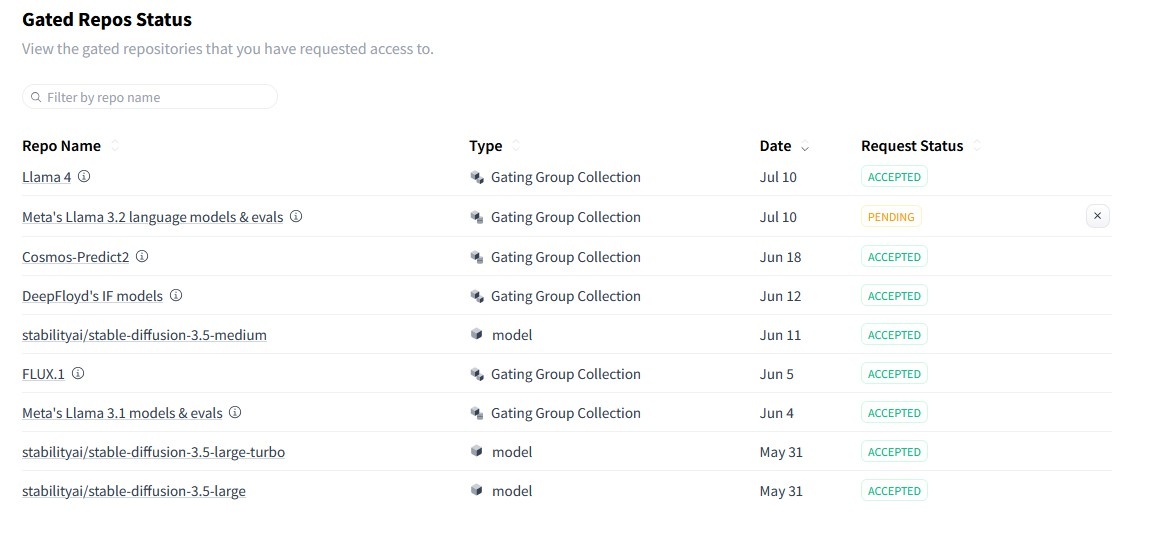
In case you got repo access, enter tokens to WebUI and still got error like
2025-06-20 13:25:36,995 | 97698f11112d | sd | ERROR | sd_models | Load model: path="/mnt/models/Diffusers/models--HiDream-ai--HiDream-I1-Dev/snapshots/5b3f48f0d64d039cd5e4b6bd47b4f4e0cbebae 62" 401 Client Error. (Request ID: Root=1-68556150-3f4018045ca5c71e00c09f88;3ae0ae6d-465e-46ed-9934-c5ea6af2097d) Cannot access gated repo for url https://huggingface.co/api/models/meta-llama/Meta-Llama-3.1-8B-Instruct/auth-check. Access to model meta-llama/Llama-3.1-8B-Instruct is restricted. You must have access to it and be authenticated to access it. Please log in. 2025-06-20 13:25:37,786 | 97698f11112d | sd | ERROR | sd_models | StableDiffusionPipeline: Pipeline <class 'diffusers.pipelines.stable_diffusion.pipeline_stable_diffusion.StableDiffusionPipeline'> expected ['feature_extractor', 'image_encoder', |
workaround is to login manually
docker exec -it sdnext-ipex bash |
inside the container
export venv_dir=/mnt/python/venv/
source "${venv_dir}"/bin/activate
/mnt/python/venv/bin/huggingface-cli login |
(venv) root@97698f11112d:/app# /mnt/python/venv/bin/huggingface-cli login

    _|    _|  _|    _|    _|_|_|    _|_|_|  _|_|_|  _|      _|    _|_|_|      _|_|_|_|    _|_|      _|_|_|  _|_|_|_|
    _|    _|  _|    _|  _|        _|          _|    _|_|    _|  _|            _|        _|    _|  _|        _|
    _|_|_|_|  _|    _|  _|  _|_|  _|  _|_|    _|    _|  _|  _|  _|  _|_|      _|_|_|    _|_|_|_|  _|        _|_|_|
    _|    _|  _|    _|  _|    _|  _|    _|    _|    _|    _|_|  _|    _|      _|        _|    _|  _|        _|
    _|    _|    _|_|      _|_|_|    _|_|_|  _|_|_|  _|      _|    _|_|_|      _|        _|    _|    _|_|_|  _|_|_|_|

    A token is already saved on your machine. Run `huggingface-cli whoami` to get more information or `huggingface-cli logout` if you want to log out.
    Setting a new token will erase the existing one.
    To log in, `huggingface_hub` requires a token generated from https://huggingface.co/settings/tokens .
Enter your token (input will not be visible): PUT HERE YOUR hf_.............
Add token as git credential? (Y/n) y
Token is valid (permission: write).
The token `SDNext` has been saved to /root/.cache/huggingface/stored_tokens
Cannot authenticate through git-credential as no helper is defined on your machine.
You might have to re-authenticate when pushing to the Hugging Face Hub.
Run the following command in your terminal in case you want to set the 'store' credential helper as default.

git config --global credential.helper store

Read https://git-scm.com/book/en/v2/Git-Tools-Credential-Storage for more details.
Token has not been saved to git credential helper.
Your token has been saved to /root/.cache/huggingface/token
Login successful.
The current active token is: `SDNext` |